Sunday, July 20, 2008

Wednesday, April 9, 2008
Wednesday, April 2, 2008
Week 5
A NEW BRIEF YAAAAAAAAAAAAAAAAY!
Today Troy showed us a bunch of videos showing examples of various kinds of animation styles one that particularly cought my eye was "Pirate Babys Cabana Battle Street Fight" by Paul Robertson
Initial Concept Ideas
Using this animation as inspiration, Im looking to create a similar style animation using the graphic styles of some old school super Nintendo games, such as 'Double Dragon' and 'Battletoads Double Dragon'

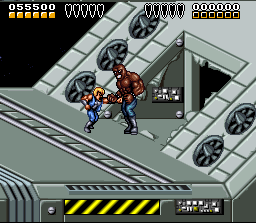
Regarding the animation, i am planning to use the gameplay of these Super Nintendo games as a basis for creating my own character animations. I have downloaded each of the games as 'snes' 'roms' and can record the gameplay using a screen recorder from this website which Troy introduced us to this morning.
http://www.fraps.com/
Today Troy showed us a bunch of videos showing examples of various kinds of animation styles one that particularly cought my eye was "Pirate Babys Cabana Battle Street Fight" by Paul Robertson
Initial Concept Ideas
Using this animation as inspiration, Im looking to create a similar style animation using the graphic styles of some old school super Nintendo games, such as 'Double Dragon' and 'Battletoads Double Dragon'
Regarding the animation, i am planning to use the gameplay of these Super Nintendo games as a basis for creating my own character animations. I have downloaded each of the games as 'snes' 'roms' and can record the gameplay using a screen recorder from this website which Troy introduced us to this morning.
http://www.fraps.com/
Monday, March 31, 2008
Synopsis
During production of the animation in After Effects i had some concerns as to how all the camera shots and scenes where going to work together, but after completely rendering the movie out and watching it as a whole completed sequence i am very happy with the way it all came together.
After obtaining a character design and construction for animation that i was happy with, I built the background scenes in photoshop and exported them as .png files
I created the character animation using flash and exported them as .swf files then imported them into After effects, where I placed them on top of the background scenes i had created in Photoshop.
Using some animation techniques in After effects i made sure the .swf movies where properly fitted to their surroundings and moved around the scenes as i had designed them to do. I found it too difficult to create the whole sequence as a single composition therefore i created it using various compositions which i fitted together at the end in a single composition. Next i created shadows for the character animations which proved a bit tricky, but in the end very effective. one of my favorite elements of After Effects are the lighting effects which i used in every scene, each with their own animation and timing, i feel that this added a vast amount to the collective atmosphere of the production.
One of the most challenging parts of the process i found was achieving the correct timing for all the sound effects. Not being able to hear the actual sounds on the main timeline makes it very difficult to match them to each animation composition, meaning that every sound clip had to be exactly the right length down to the specific frame!
With the sound now matching to the animation compositions, i animated camera effects in most of the scenes (street walk, stage performance 1,2,3) with the crowd scenes i just used scaling to create a zooming effect.
The final task i had was pasting each of the compositions in order and time within one large composition, and creating fade out effects where necessary so that one composition would move effectively to the next!
After obtaining a character design and construction for animation that i was happy with, I built the background scenes in photoshop and exported them as .png files
I created the character animation using flash and exported them as .swf files then imported them into After effects, where I placed them on top of the background scenes i had created in Photoshop.
Using some animation techniques in After effects i made sure the .swf movies where properly fitted to their surroundings and moved around the scenes as i had designed them to do. I found it too difficult to create the whole sequence as a single composition therefore i created it using various compositions which i fitted together at the end in a single composition. Next i created shadows for the character animations which proved a bit tricky, but in the end very effective. one of my favorite elements of After Effects are the lighting effects which i used in every scene, each with their own animation and timing, i feel that this added a vast amount to the collective atmosphere of the production.
One of the most challenging parts of the process i found was achieving the correct timing for all the sound effects. Not being able to hear the actual sounds on the main timeline makes it very difficult to match them to each animation composition, meaning that every sound clip had to be exactly the right length down to the specific frame!
With the sound now matching to the animation compositions, i animated camera effects in most of the scenes (street walk, stage performance 1,2,3) with the crowd scenes i just used scaling to create a zooming effect.
The final task i had was pasting each of the compositions in order and time within one large composition, and creating fade out effects where necessary so that one composition would move effectively to the next!
Sunday, March 30, 2008
Thursday, March 27, 2008
DVD
This is the Background I am going to use for the DVD menu, which i plan to create using Nero 8. The DVD will feature both the completed animation and the rough cut that i have shown in previous posts.
Nero 8 enables you to create a menu that shows a small section of the animation next to its title, making it easier for the user to choose what they wish to view first. I thought that this was an evective feature rather than simply using text based buttons.

DVD packaging

Nero 8 enables you to create a menu that shows a small section of the animation next to its title, making it easier for the user to choose what they wish to view first. I thought that this was an evective feature rather than simply using text based buttons.

DVD packaging

Thursday, March 20, 2008
Further Character design
In order to achieve some of the actions performed by my 'rPod' character, i redrew the hands a number of times, to suit each change in position or movement. Most of the hand movements could be achieved by simply altering the size and shape in flash however seeing as the hands were the most animated objects they had to look convincing therefore redrawing them from a few different perspectives was necessary.

Title for Animation, DVD menu and packaging


Title for Animation, DVD menu and packaging

Subscribe to:
Posts (Atom)